Loading

Locations
Entrega instantánea por QR · Sin tarifas de roaming · Todos los planes se activan en minutos
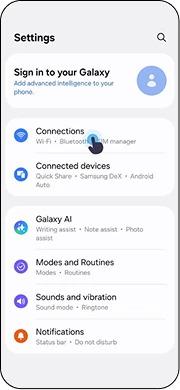
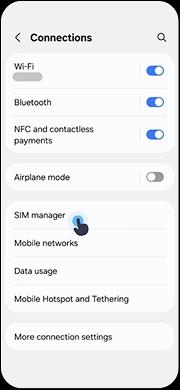
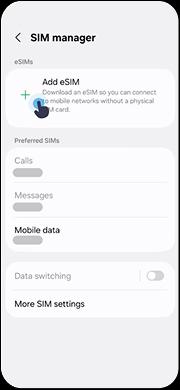
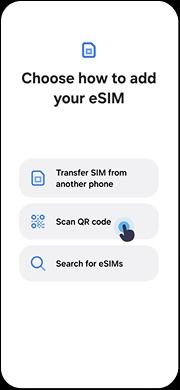
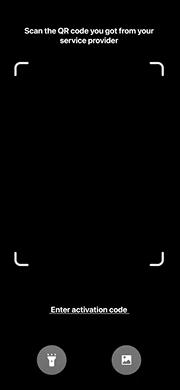
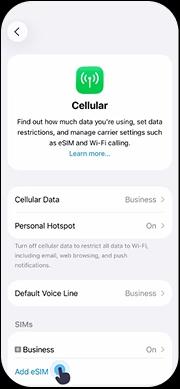
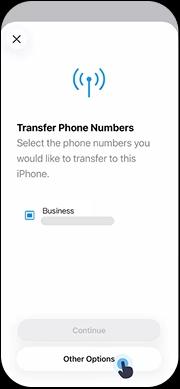
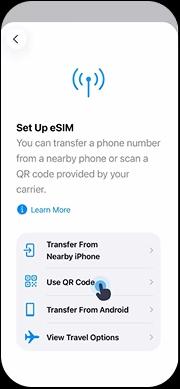
Europa ofrece viajes transfronterizos sin complicaciones entre decenas de países, lo que convierte a una eSIM regional o de país en la compañera de viaje ideal tanto para turistas como para viajeros de negocios y nómadas digitales. ¿Buscas la mejor eSIM para Dominica? Con una eSIM prepago de CloudOn, obtienes acceso instantáneo a datos móviles de alta velocidad 4G/LTE y 5G sin la molestia de comprar tarjetas SIM físicas, visitar tiendas de operadores ni pagar costosas tarifas de itinerancia internacional. CloudOn te conecta a redes móviles locales de confianza en Dominica para una cobertura fiable dondequiera que vayas. Los países europeos cuentan con sólidas redes 4G/LTE y un 5G en rápida expansión, con una cobertura fiable incluso en zonas rurales y pueblos pequeños de la UE y el espacio Schengen. Solo tienes que elegir un plan, escanear el código QR con tu iPhone o dispositivo Android compatible con eSIM, y ya estarás conectado: toma menos de 5 minutos desde la compra hasta la activación.
Entrega instantánea del código QR: tu eSIM para Dominica está lista en segundos, sin necesidad de envíos
Cobertura fiable en las principales redes móviles de Dominica
Sin tarifas de itinerancia: usa tarifas de datos locales prepago en lugar de costosos cargos de itinerancia internacional
Mantén tu número de casa: usa la doble SIM para seguir localizable en tu número habitual mientras usas CloudOn para los datos
Planes flexibles: elige entre paquetes de datos diarios, semanales o mensuales para Dominica según tu viaje
Atención al cliente 24/7: obtén ayuda en cualquier momento por chat, correo electrónico o WhatsApp
¿Nuevo en la tecnología eSIM? Descubre cómo funciona la eSIM o comprueba si tu teléfono es compatible en nuestra página de compatibilidad de dispositivos. ¿Viajas a varios países? Compara planes eSIM regionales y globales para la mejor cobertura multinacional.
Conseguir una eSIM prepago para Dominica es rápido y sencillo: todo el proceso lleva menos de 5 minutos desde la compra hasta la activación.
Explora los planes eSIM para Dominica de arriba y selecciona la cantidad de datos y el período de validez que se ajusten a tu viaje. Tanto si necesitas un plan corto de 1 a 3 días como un paquete completo de 30 días, CloudOn tiene opciones flexibles para cada viajero.
Completa tu compra de forma segura en línea. El código QR de activación de tu eSIM para Dominica se entrega al instante en tu correo electrónico y en tu cuenta de CloudOn, sin esperar envíos ni tarjetas SIM físicas.
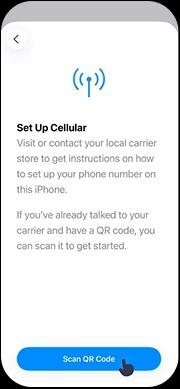
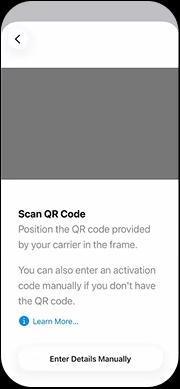
Abre la cámara o los ajustes de eSIM de tu teléfono y escanea el código QR para instalar el perfil de la eSIM. Te recomendamos hacerlo antes de viajar a Dominica, mientras todavía tengas Wi-Fi. ¿Necesitas ayuda? Consulta nuestra guía de instalación paso a paso para iPhone y Android.
Cuando llegues a Dominica, simplemente activa la eSIM en los ajustes de tu dispositivo. Tu teléfono se conectará automáticamente a una red local: disfruta de datos de alta velocidad sin tarifas de itinerancia desde el momento en que aterrizas.
Todo lo que necesitas saber sobre comprar y usar una eSIM en Dominica.
¿Tienes más preguntas? Visita nuestro Centro de ayuda para guías detalladas, o contacta con nuestro equipo de soporte: estamos disponibles 24/7.
Lee nuestras guías de viaje para aprovechar al máximo tu experiencia eSIM en Dominica.
Descubre cómo funciona la tecnología eSIM y por qué es mejor que las tarjetas SIM físicas para los viajes internacionales.
Instrucciones paso a paso para instalar tu eSIM en dispositivos iPhone y Android.
Comprueba si tu teléfono es compatible con eSIM antes de comprar tu plan de datos para Dominica.
Explora los más de 200 países y regiones donde está disponible la eSIM de CloudOn.
Explora los planes eSIM multipaís que cubren Europe: ideales si vas a visitar varios países de la región.
Explora y compara planes eSIM locales, regionales y globales con precios transparentes.
¿Viajas a más de un país en Europe? Consulta los planes eSIM de estos populares destinos cercanos, o explora nuestros planes eSIM regionales para cobertura multinacional.





